Clean all the leaves Guides & Walkthroughs
From your first leaf pile to a full-map clean — pick the guide that matches your session goal.
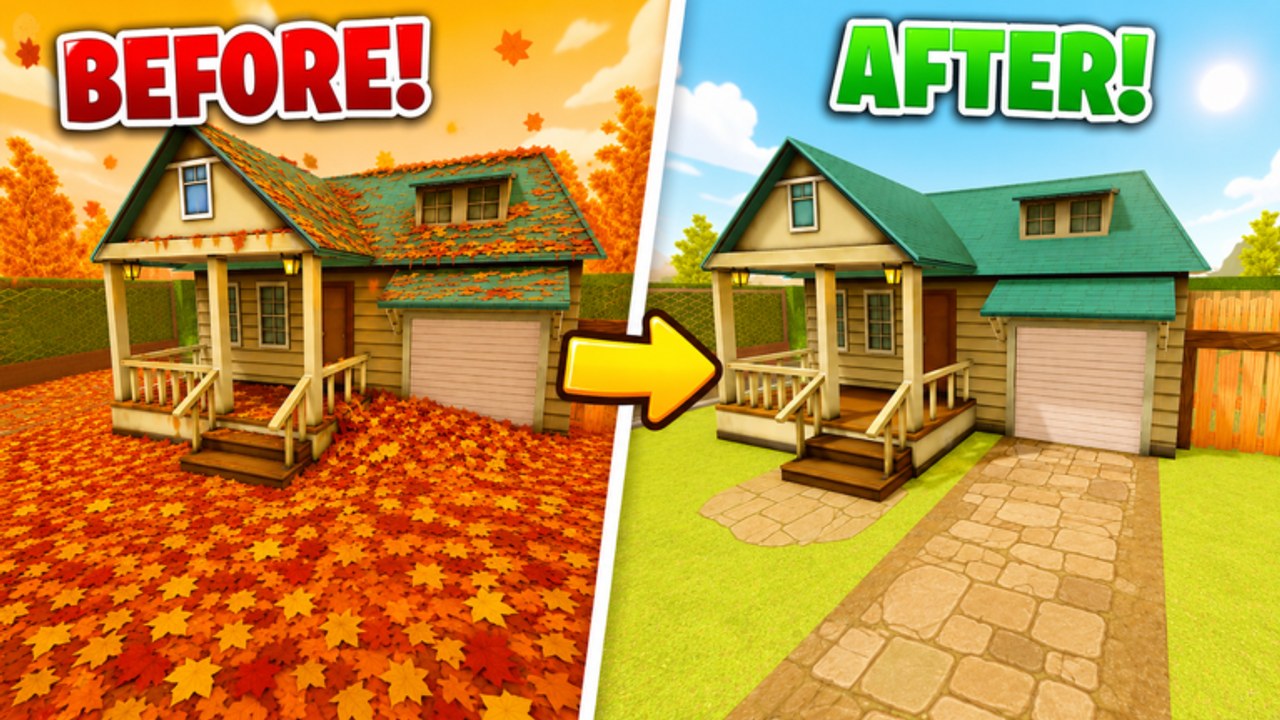
Welcome to the guides hub
Clean all the leaves! is a Roblox Adventure/Story experience from Muffin Interactive. Your friends left you with one job: clean every leaf before they return. You buy and upgrade tools, expand what you can carry, unlock more of the map, and push toward a full clean for the secret ending. This hub is the map of every how-to page on the wiki — use it when you know the goal but not which article to open.
The game released on 2026-07-21 and supports online co-op with up to 12 players. Platforms are Roblox only. Community tools and player reports confirm a core loop of collecting leaves, selling them for cash, upgrading bags, buying and equipping tools, solving the garage button puzzle, using vents, shopping upgrades, and moving with walk/sprint style controls.
Start here if you are new
Open Getting Started for your first session plan. That guide walks the safe order: collect → sell → buy tools → upgrade bag → unlock areas. Pair it with How to Play if you want the official four-step card expanded (timer, tools, map unlocks, 100%). It also points you toward movement habits, early map progression, and when codes matter (spoiler: there are no verified active codes yet — see the Codes Hub).
If you already understand the loop but feel slow, skip ahead to Clean Faster. That page prioritizes bag capacity, tool upgrades, sell timing, sprint routes, and garage button tips so each minute in a server pays more cash and more percent cleaned.
Progression and endgame guides
Map access is gated. Area Unlocks covers keys, clearing zones, the garage door button puzzle, and vents access without inventing unconfirmed Steam-style area names. Use it when you can see a blocked door, vent, or locked wing and need a methodical checklist.
When the yard is mostly clear and you are hunting the last percent, read Last Leaves first, then Secret Ending. The ending guide explains how to aim for 100% clean and the secret ending without dumping every story beat. Bring a checklist, finish remaining pockets of leaves, and confirm unlocks so nothing is soft-locked behind an unopened route.
Two more tracks sit beside the ending:
- How to Get Classes — in-game class menu walkthrough. We do not invent class names or stats; the live menu is the source of truth after the 12 Aug 2026 universe update.
- Leaf Collection — the rare special leaves badge. It is not a substitute for 100%. Official badge text and rarity notes live on Badges.
Playing with friends
Clean all the leaves! shines in a full lobby. Co-op Tips covers role splitting (collectors vs sellers vs unlock runners), callouts for vents and garage buttons, etiquette in teams-tagged servers, and how to avoid double-selling dead time when twelve people share one yard.
How these guides connect
Think of the articles as a path, not a pile:
- Getting Started — learn the economy and first unlocks
- How to Play — official four-step loop and timer habits
- Clean Faster — tighten routes and upgrade priority
- Area Unlocks — open garage, vents, and gated map parts
- How to Get Classes — unlock playstyles from the live class menu
- Last Leaves — find leftover percent in the high 90s
- Leaf Collection — rare special-leaf badge track
- Secret Ending — finish 100% with a calm checklist
- Co-op Tips — scale the same plan across a squad
The desktop nav dropdown shows a short list plus View all back to this hub, so the complete index always lives here rather than in an endless menu.
Cross-links inside each guide point to siblings so you can hop sideways without returning here every time. Codes and redeem help live under Codes and How to Redeem Codes if a future promo drops.
What we will not invent
This wiki sticks to confirmed systems: leaf collecting, cash selling, bag upgrades, tool buy/equip, garage button puzzle, vents, upgrades shop, and walk/sprint movement. We do not invent Leaf it Alone Steam area names or paste codes from other leaf games. If a mechanic is unconfirmed, we say so and give a process instead of a fake map label.
Session goals cheat sheet
- First 20 minutes: Getting Started + How to Play — sell early, buy a better tool, respect the timer
- Efficiency night: Clean Faster — route discipline and upgrade order
- Stuck behind a door: Area Unlocks — garage button, vents, zone clearing
- Class menu unlocked: How to Get Classes — confirm rows in-game, not from old screenshots
- Stuck at 96–99%: Last Leaves — edges, garage interiors, vent pockets
- Rare badge hunt: Leaf Collection — special leaves, not the common ending badge
- Full friend group: Co-op Tips — assign lanes and unlock duty
- Almost done: Secret Ending — 100% sweep and secret ending readiness
Keep the wiki useful
Guides assume the live Roblox build after the July 2026 release. After a big patch, re-check upgrade costs and unlock order in-game; the loop usually stays the same even if numbers move. Pair this hub with honest code status on Codes so you never derail a cleaning session chasing dead promos.
Pick a guide above and get back to the leaves — the friends will not wait forever.
Frequently Asked Questions
Quick answers about Clean all the leaves and this wiki.
Which guide should I read first?
Start with Getting Started for the collect-sell-upgrade loop, then Clean Faster once you understand the basics.
Is Clean all the leaves! single-player only?
No. It supports online co-op with up to 12 players on Roblox. See the Co-op Tips guide for squad roles.
Where do I learn about the secret ending?
Open the Secret Ending guide for a 100% checklist that avoids heavy story spoilers.
Do the guides include promo codes?
Codes live on the Codes Hub. Guides focus on gameplay; there are currently no verified active codes.
What systems are confirmed in these guides?
Leaf collecting, selling for cash, bag upgrades, tools, garage button puzzle, vents, upgrades shop, walk/sprint movement, classes via the live menu, and two official badges.
Where do classes and leftover percent live?
Open [How to Get Classes](/guides/classes/) for the class menu and [Last Leaves](/guides/last-leaves/) when you are stuck in the high 90s. Special leaves are on [Leaf Collection](/guides/leaf-collection/).